Orchestration and fleets
Read this when one machine is not enough. snowglobe daemon runs many machines
from one site, without KVM, root or Docker. It forks them in milliseconds, keeps snapshots of running
ones, puts services behind ports that scale to zero and checks their health, restarts what fails as
supervisors say, holds them all to a memory budget, and applies whole fleets from a file.
The words this page uses:
| Word | What it is |
|---|---|
| template | a site restored once, for machines to fork from |
| machine | forked from a template in tens of milliseconds; shares the template's memory and keeps what it writes |
| snapshot | a running machine saved whole, to start machines and templates from |
| service | a template's machines behind host ports, started on demand, scaled to zero, and optionally health-checked and healed |
| link | a name one machine reaches another by; nothing else joins them |
| supervisor | an ordered list of services, machines and supervisors, restarted as its strategy says when one fails, as in Elixir |
| fleet | a snowglobe.toml naming all of the above, applied in one go |
| fleet instance | one copy of a fleet's services, machines and links, like docker compose -p |
Templates and machines: the daemon
Start the daemon, add a template, then fork machines from it with snowglobe up:
snowglobe daemon --detach                        # in the background, its log in daemon.log beside the socket
snowglobe template add dist/api --name api       # the python example built with --network fetch
snowglobe up api --name web -p 8080:8000 --label app=web
snowglobe up api --name worker                   # another machine, its own state
snowglobe sh web 'python3 -m http.server 8000 &'
snowglobe ps
snowglobe stop worker
snowglobe template rm api                        # and its machines
- A machine shares the template's memory, lasts until it is stopped, and keeps what it writes.
- The daemon forwards a machine's ports. Its site needs a network for that.
sh,cp,exec,attach,psandstopreach the daemon's machines as they reach instances.
Nothing the daemon starts outlives it:
- Stopped (ctrl-c, SIGTERM,
snowglobe daemon stop), it stops its template servers, machines and builds. A second ctrl-c skips the grace. - Killed outright, they stop themselves: each holds a lifeline to it.
- Started again, it restores its templates from their sites and starts its services' replicas. Machines are not brought back.
Snapshots of running machines
Set a machine up once (dependencies installed, a server started, data loaded), then fork as many as you want, already set up.
snowglobe snapshot save saves a machine whole: its memory, its running processes and the
files it wrote. Start machines from it with up --snapshot, or make it a template of its own
with template add --snapshot.
snowglobe up api --name base
snowglobe sh base 'pip install httpx && python3 -m http.server 8000 &'
snowglobe snapshot save base --name ready        # tens of milliseconds
snowglobe template add --snapshot ready --name api-ready
snowglobe up api-ready -p 8000                    # installed, its server already listening
snowglobe snapshot ls
snowglobe snapshot rm ready
Services and scale to zero
A service puts a template's machines behind host ports that the daemon holds. Each connection (or
snowglobe sh <service>) goes to one of its replicas, started on demand.
snowglobe service add web --template api-ready -p 8080:8000 --min 0 --max 3 --idle 5m --concurrency 10
snowglobe service add db --template pg --state keep --idle 10m
snowglobe service ls                              # replicas running now, of each
snowglobe service rm web
| Flag | What it does |
|---|---|
--min 0 | scale to zero: replicas with no connection or job for --idle stop, and the next request forks one again. Under --min, replicas that stop are replaced |
--max | the most replicas |
--concurrency | connections a replica takes before another is started, up to --max |
--idle | how long a replica may sit with no connection or job |
--state discard | the default: every replica starts from the template |
--state keep | saves the replica before it stops, and the next one carries on from that save (one replica) |
Made of a snapshot whose server was already listening, a service at zero answers its first request in about 20 ms.
Health checks and healing
A machine whose process died is already noticed and dropped, and a service under its --min
starts another. A health check catches what is still running but broken: a server that hangs, or one
that answers every request with a 500. Each running replica is checked in one of two ways. An HTTP GET
to a guest port passes when the answer's status is in range: a port that only accepts connections
doesn't pass. A command in the guest passes when it exits 0.
snowglobe service add api --template api-ready -p 8080:8000 --health-http 8000/healthz
snowglobe service add db --template pg --state keep --health-cmd 'pg_isready -q' --heal hook --heal-cmd 'pg_ctl restart'
snowglobe service ls                              # HEALTH: starting, healthy, unhealthy, idle or degraded
snowglobe service heal api                        # start healing over, once what broke it is fixed
[services.api.health]
interval = "10s"     # how often each replica is checked
timeout = "2s"
failures = 3         # failed checks in a row that make it unhealthy
grace = "30s"        # after it starts, failures don't count yet
heal = "replace"     # or drain, hook (with heal_cmd), none
drain = "30s"        # time for open connections to end before it is stopped
wait_ready = false

[services.api.health.http]
port = 8000
path = "/healthz"
status = "200-399"   # or a list: "200,204"
| heal | What happens to an unhealthy replica |
|---|---|
replace | the default: taken out of service (nothing new goes to it, and it no longer counts towards max), given drain for its connections to end, then stopped. If the service is below min without it, another starts at once; otherwise the next connection starts one |
drain | taken out of service and kept as it is, for you to look at (snowglobe sh its machine); it stops once it has been idle for idle |
hook | runs heal_cmd in the guest (restart the app, say) and checks it again from the start. If it is unhealthy again, it is replaced |
none | only reported: the event and its health. It stays in service, but gets connections only when no other replica can take them |
Checks never get in the way of scale to zero. A service at zero has nothing to check and isn't woken.
A check doesn't count as use, so a healthy replica with no traffic still stops after idle.
A replica that is being stopped, or is about to stop for being idle, isn't checked. A replica that failed
its check is never saved: with state = "keep", the next one starts from the last good save,
and from the template if that one fails too.
Whatever the strategy, a replica that failed its check is the last choice for a connection, until it
is healed or passes again. A connection goes to a healthy replica, even a busier one, first. When every
replica is unhealthy and the service is below max, a new replica starts and takes it, unless
the service is degraded: a new one would fail too, so what there is is used.
Heals are spaced out. Each heal of a service waits twice as long as the last one, starting at
interval and capped at 5 minutes, so a dependency that every replica shares can't make the
service replace them all at once. After 5 heals in a row with no replica passing a check, healing stops
and the service is degraded until one passes, or until you start healing over with
snowglobe service heal NAME (the heal_service tool, POST /v1/services/{name}/heal)
once you have fixed what broke it. That clears the backoff, tries hooks again and, with
state = "keep", starts from the last save again. wait_ready holds a new
replica's first connection until it passes a check (up to grace). It is off by default
because it adds the first check's time to every start from zero. Events: service.replica_healthy,
service.replica_unhealthy, service.replica_healing,
service.replica_draining, service.replica_drained,
service.replica_replaced, service.degraded, service.healthy,
service.heal_reset.
Machines and templates take the same check. snowglobe up --health-cmd ... (or
[machines.NAME.health]) checks a machine, and a template's check
(snowglobe template add --health-*, [templates.NAME.health]) is what its services
and machines have when they set none of their own. A machine isn't one of many, so it heals by
none (the default: it is reported) or hook; to have one restarted, put it under a
supervisor. Its checks are in /v1/machines as checks,
and its events are machine.healthy, machine.unhealthy, machine.healing
and machine.degraded.
Changed in place. snowglobe health service|machine|template NAME with a check's flags
(or --none) changes a check without restarting anything: PUT /v1/{kind}s/{name}/health,
the set_health tool. A fleet does the same: a file whose only change is a health check plans
it as * service web (health check, in place), and its replicas stay.
Supervisors
A supervisor watches an ordered list of children (services, machines and other supervisors) and restarts them when one fails, as an Elixir supervisor does its processes. A child fails when its health check makes it unhealthy (a replica of it, for a service), or when its process ends without being asked to. Put first what the others need: a database before the app that uses it.
snowglobe supervisor add app --strategy rest_for_one --child service/db --child service/api --child machine/worker:transient
snowglobe supervisor ls                           # each child's state, and the restarts counted now
snowglobe supervisor restart app                  # start it over, once degraded
[supervisors.app]
strategy = "rest_for_one"     # or one_for_one (the default), one_for_all
children = ["db", "api", "worker"]
max_restarts = 3              # restarts allowed in max_seconds
max_seconds = "60s"

[supervisors.app.restart]
worker = "transient"          # permanent (the default), transient or temporary
| strategy | When a child fails, what is restarted |
|---|---|
one_for_one | the default: that child alone. For a service, the replica that failed |
one_for_all | every child |
rest_for_one | that child and every child after it in the list: db failing restarts api and worker too, api failing leaves db be |
What is restarted is stopped in reverse order, then started in order. A machine starts again as it was:
its name, template, ports, labels, snapshot and links (and what is left of its ttl). A service's
running replicas are replaced, as many as were running, so a service at zero stays at zero. A supervisor
restarts all of its children.
A child's restart type says whether it is restarted. permanent (the default) always is.
transient is restarted when it fails its check, but its process ending is a normal exit: a
machine that runs a job and stops, say. temporary never is, and, as in Elixir, its failure
restarts nothing else either; a temporary sibling is left alone when the others restart.
More than max_restarts restarts within max_seconds and the supervisor fails
itself. A supervisor that is another's child is then its parent's failed child, and the parent's strategy
decides (restarting it restarts all of its children). A top-level one stops restarting and is
degraded until snowglobe supervisor restart NAME. A supervised service's own
heal isn't used: its supervisor restarts it. Unsupervised, a service heals as above, and a machine
is only reported. Removing a supervisor leaves its children running. Events:
supervisor.restarted, supervisor.escalated, supervisor.degraded,
supervisor.child_exited.
Fleets: snowglobe apply
A snowglobe.toml says what the daemon should have, and snowglobe apply gets it
there. One file goes from source to running services. It can hold:
- templates: a built site, a URL, or a Dockerfile directory built first;
- snapshots: a machine of a template set up by commands, saved once a readiness command succeeds. A command is a string, or
{ cmd = "...", timeout = "90s" }for one with a time limit of its own; one without gets the snapshot'stimeout, or 10 minutes; - templates of those snapshots. A template's
startcommands run in each of its machines as it comes up, before it is used: servers start there (why); - services, each with an optional health check (below), and machines;
- supervisors over those services and machines (above);
- links, a network mode, and each template's egress (below).
A small one:
[templates.py]
build = "../python"                # built first, for running natively
network = "fetch"

[snapshots.serving]
template = "py"
run = [
  { cmd = "pip install httpx", timeout = "3m" },   # a time limit of its own
  "mkdir -p /srv && echo hello > /srv/index.html",
]

[templates.serving]
snapshot = "serving"
start = [                          # in each machine as it comes up: its own server
  "cd /srv && python3 -m http.server 8000 >/dev/null 2>&1 &",
  "until wget -q -O /dev/null http://127.0.0.1:8000/; do sleep 0.2; done",
]

[services.web]
template = "serving"
ports = ["8080:8000"]
min = 0                            # scaled to zero, woken by a request
idle = "5m"

[services.web.health.http]          # swapped for a fresh one if it stops answering 2xx/3xx
port = 8000
path = "/"

[machines.scratch]
template = "py"
ttl = "24h"
snowglobe diffsays what apply would do.snowglobe downremoves all of it.- An entry that changed is replaced, with what is made from it. One gone from the file is removed. Names something else uses are refused.
Randomness after a restore
Every machine of a template is a copy of one saved machine. The guest kernel's random generator is
reseeded at each restore (a new VM generation id, as Firecracker gives), so /dev/urandom,
getrandom and every process started after the restore draw their own. A process that was
already running when the machine was saved is copied with its memory, and its random state with it:
Node's Math.random, crypto.randomBytes and crypto.randomUUID,
Erlang's :crypto (OpenSSL keeps its generator in the process), Python's random.
Each copy then makes the same "random" tokens, keys and ids as the others. A process forked after the
restore (a Postgres backend) reseeds itself.
- Start servers in the template's
start, not in a snapshot'srun. Each machine then starts its own.startruns after the machine's links are set and before anything uses it (a service's first connection, the fleet's next step); each command must succeed in its time ({ cmd, timeout }, 2 minutes by default), or the machine goes.snowglobe template add --start CMDdoes the same. applywarns when a snapshot's commands leave something running, and names it. What the site's own processes start meanwhile (a backend its Postgres forks for a query) is the site's, and not named.- A site whose image starts its server before it is built (its Dockerfile's command) holds that
server too. Set the template's
restart_app = true(snowglobe template add --restart-app): each machine then starts the site's app again as it comes up, after its links are set and before itsstart, and is handed over once the app prints the site's ready text again (it goes if the app isn't ready in 100 s). With a kernel, the app's console session ends (the app and what it started in its session) and init starts it again; with none, the program starts afresh as the build started it, on the machine's own files. A site built before snowglobe 0.28 needs building again for this. Or restart it yourself instart, asexamples/todo-fleetdoes with its app.
The daemon keeps a list of fleets, like compose projects. /v1/fleets adds a file from where
it is, or writes a new one in the daemon's own directory (checked before it is saved). It plans, applies
(all of it, or one step at a time by its key) and removes each by name.
Two examples ship with snowglobe:
examples/todo-fleet/: an Elixir app and Postgres, each a machine of its own, joined by a link. It is the fleet in the figure below.examples/fleet/: Supabase and a small Bun viewer, joined by a link. A Bun process (the one inside the Supabase CLI) inserts a row every second; the viewer, on the 160 MB bun machine, follows the table over Supabase Realtime through the link and streams it to a Preact page. Each has a health check healed by a hook, and each template starts its process instart. It runs in a browser tab too, phones included: the viewer is small, so most of the tab's memory goes to Supabase.
Run one, see it, and give it to an agent:
snowglobe daemon --detach
snowglobe apply -f examples/todo-fleet/snowglobe.toml
curl localhost:8080/todos
snowglobe ui                                     # views: overview, network, fleets, machines, run, builds
claude mcp add snowglobe -- snowglobe mcp --daemon   # fleets, links and the graph, over MCP
Links: what reaches what
Nothing joins machines but a link. A link gives a machine a name to reach another by: its guest connects
to db.internal:5432 and gets the target's guest port.
- From: a machine, or every machine of a template, now and later.
- To: a machine, a service (one of its replicas, started if none runs), or a template's machines.
- While running: links change while machines run, and new connections follow them.
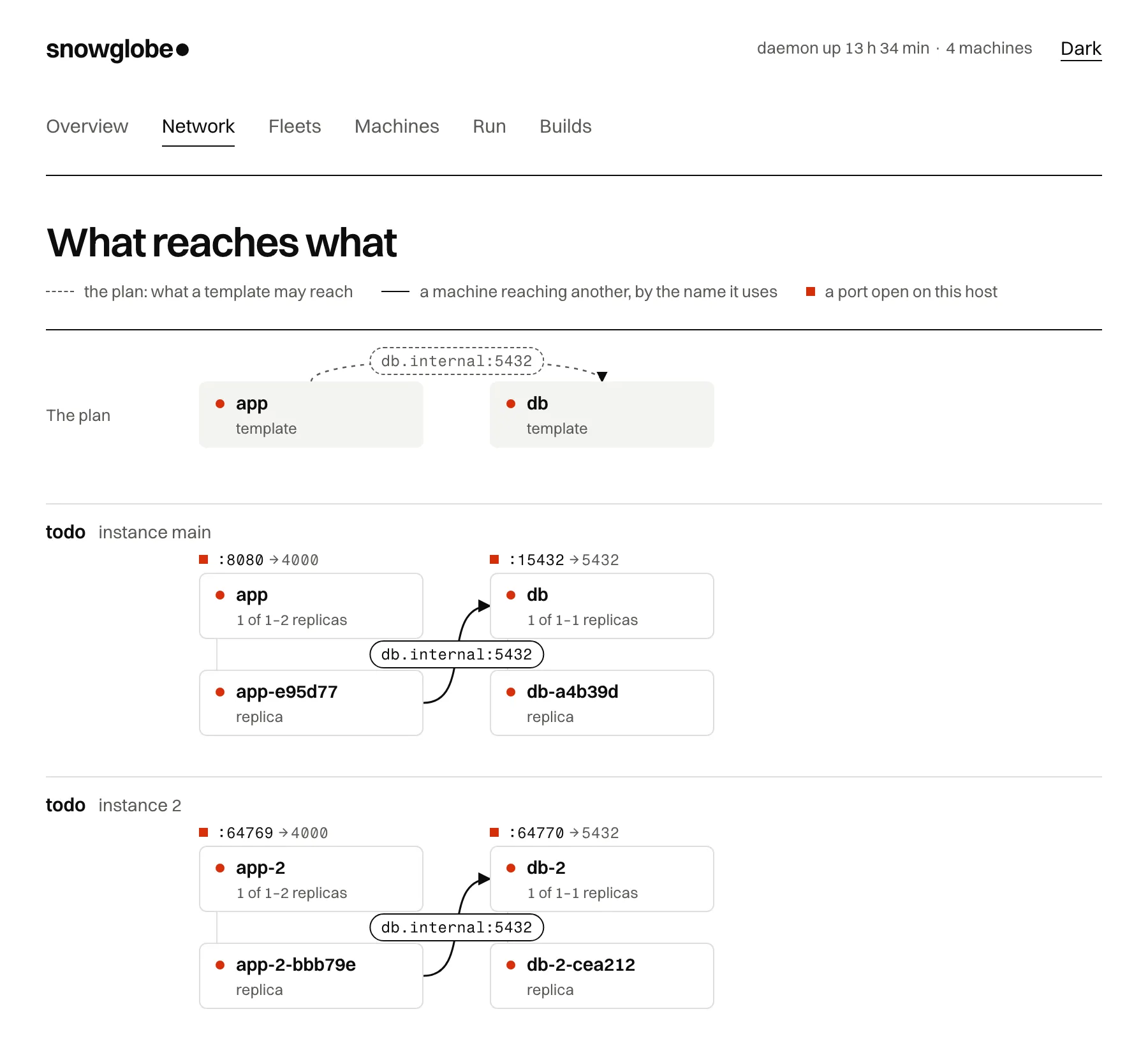
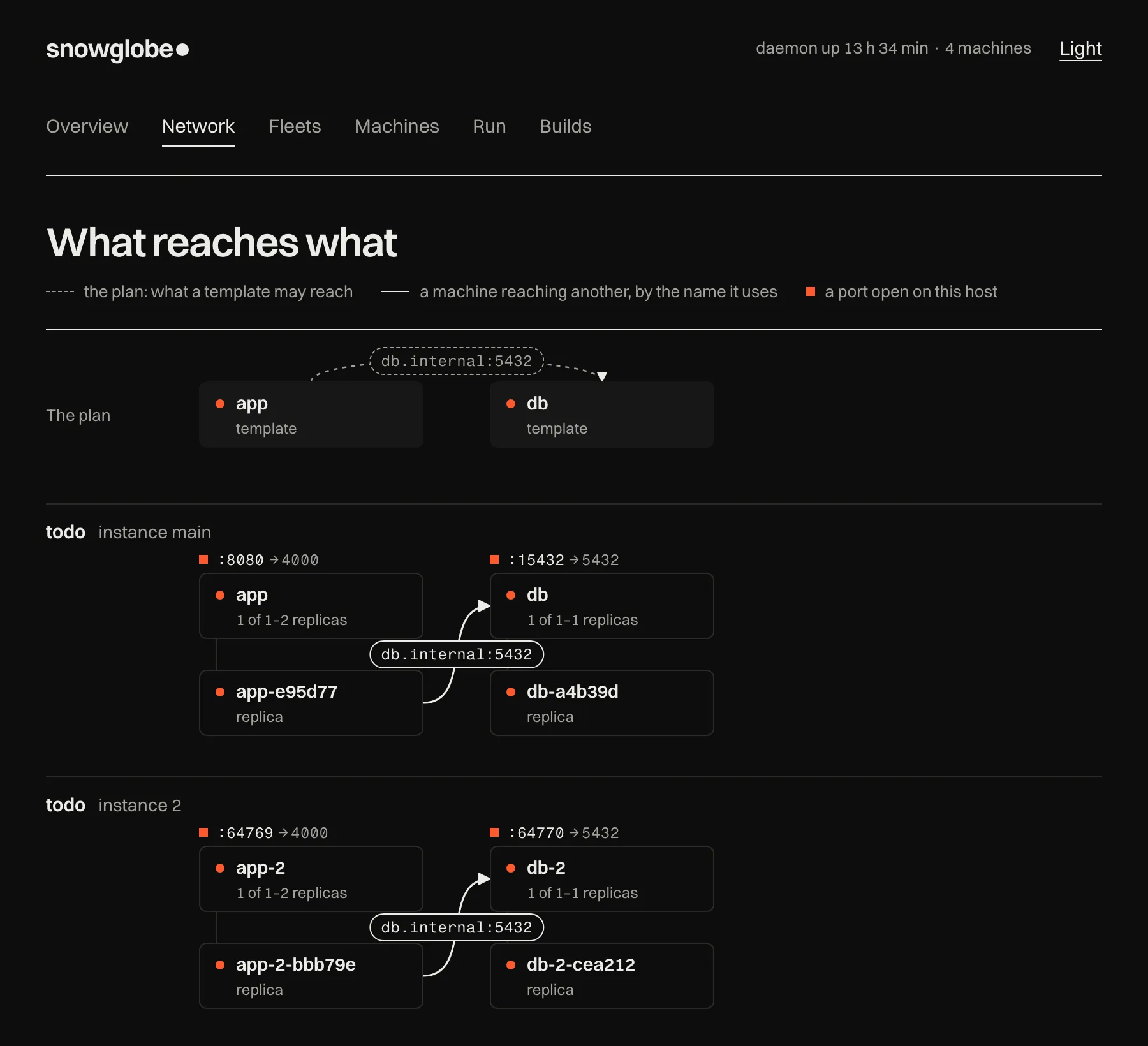
examples/todo-fleet in snowglobe ui: an Elixir app and Postgres, in two
instances. Instance 2's app reaches its own database as db.internal:5432, and nothing of main's.In a fleet file a link is a [links.NAME] entry (below). Over the
API:
curl --unix-socket "$SOCK" -X POST localhost/v1/links \
  -d '{"from": "app", "to": "db", "port": 5432, "as": "db.internal"}'
curl --unix-socket "$SOCK" localhost/v1/graph      # nodes and edges: forks, replicas, links, reaches, ports
Each machine gets a Unix socket of its own for each of its links, in its template's socket directory.
Only that template's machines and the daemon reach it. So the daemon knows which machine connects, and
no TCP port stays open on the host for anything else to use. The machine never connects to that socket
itself: its sandbox lets it reach no Unix socket at all, so it can't reach another machine's or its
server's. Instead it asks the daemon for each connection, and the daemon connects and hands the
connection over. A link is the host's own: it needs no
allow_private, and works when the machine's egress is none.
Fleet instances and the network
A fleet runs as instances, like docker compose -p. Start another and it gets an app and a
database of its own, beside the first.
- Templates and snapshots are shared: built and restored once.
- Services, machines and links are made per instance, labelled
snowglobe.instance. - Instance
mainkeeps the file's names. Another carries its own (db-2), and the system picks its host ports.
Start and remove instances from the UI, the API (POST /v1/fleets/NAME/instances,
DELETE /v1/fleets/NAME/instances/ID) or MCP (start_instance,
stop_instance).
The file's [network] mode says what may cross between instances, and each template's
egress says where its machines' own connections may go:
[network]
mode = "exclusive"        # each instance reaches only its own machines (the default)

[templates.app]
build = "app"
egress = "internet"       # none (the default), internet, or private

[templates.db]
build = "db"
expose = [5432]           # what the others reach under mode = "all"

[links.app-db]
from = "app"
to = "db"                 # a service or machine of the file
port = 5432
as = "db.internal"
| Network mode | What may cross |
|---|---|
exclusive | the default: a link stays inside its instance. Instance 2's app reaches instance 2's db and nothing of instance main's |
inclusive | every machine of the template reaches any machine of the target's template, across instances |
all | as inclusive, and every template also reaches every other one's exposed ports by its name |
| Egress | Where a machine's own connections may go |
|---|---|
none | the default: nowhere. Only links and forwarded ports work |
internet | public addresses |
private | the host's loopback and private networks too, as allow_private did |
The same file in a browser: /fleet/
The demo site's /fleet/ runs a fleet file in one tab, on the machines of the
agent page. Load or write the file, read the plan, then Run each step
or Run all. It is another place to run the file, not another format: the same snowglobe.toml
goes to snowglobe apply.
- The file is coloured as you type. A
runcommand can be a multi-line string (three single quotes, as written, or three double quotes, with escapes), which reads like a shell script. Heredoc terminators need column 0, since TOML keeps the indentation.runstays an array, even for one command, and a file kept on Windows should have LF line endings (the repo's.gitattributessets that for.toml;snowglobe applyalso reads CRLF as LF). - The graph above the steps draws the machines the file uses, and an arrow for each link labelled with the name and port the guest uses. A dashed box is asleep, a red one is busy.
- Stop ends what runs, closes the frame, clears the links and sends every machine the file uses back to its image, so each step is pending again. What the machines did is forgotten.
- How many machines are awake at once is raised to the number the file uses (up to 8) when you run it, since a viewer linked to two sources needs all three awake. Stop puts it back to 2.
- The Templates menu next to
Load the example
holds small fleets to try, which areexamples/fleet/templates/in the repo. - Steps. A snapshot's
runcommands andreadycheck, each link, each machine woken, each service opened in a frame. Starting a command wakes its machine if it sleeps, and may take up to 3 minutes (a cold Supabase on a phone takes more than one); a machine that then stops answering is given up after 30 seconds. - Templates name a site the page has:
build = "../python"is thepythonmachine. One site is one machine on the page, so templates of one site share its files and processes. - Links are real. A guest on port 80 or 443 makes HTTP(S) requests. Any other port
(
as_port, defaultport) is a raw TCP stream, which carries Postgres, Redis and WebSocket traffic alike. A guest'sws://name/on 80 or 443, and a page in the frame, can open WebSockets too. A machine reads its links when it wakes. - Health checks run once a step is done, with the daemon's defaults and rules. A check never wakes
a sleeping machine, and doesn't count as use, so a machine still sleeps when idle.
replacestarts the machine from its image and runs its steps again.hookrunsheal_cmdand checks again.drainonly reports, since the page has one machine and nothing to take out of service. After 5 heals in a row with no check passing, the step is degraded.wait_readyholds a service's step until it passes. - Supervisors restart their children by strategy, restart type and
max_restarts/max_seconds, as the daemon does. A nested supervisor that gives up fails its parent, and a top-level one is degraded until you press its Restart. A child is restarted by starting its machine from its image and running that machine's steps again, so children of one site restart together. A supervised machine that stops by itself has ended. - Start: a template's
startcommands run once in its machine, before its first service or machine step, each in its time. - Read, not applied:
min,max,idle,concurrency,ttl,egress,network.mode, labels and host ports. The page lists them.
In a browser: snowglobe ui
snowglobe ui shows the daemon in your browser, one view at a time:
snowglobe ui                                     # opens http://127.0.0.1:7777/?token=…
snowglobe ui --start-daemon                      # starts a detached daemon first if none runs
- Overview: the last hour on one time axis (memory against the budget, templates running, jobs and their latency, what happened), and a lane per template with each machine's life as a bar.
- Network: what reaches what. The templates and the links between them come first, dotted: the plan. Under them is a group per fleet instance, its machines in their template's column. Solid edges show where a machine really reaches another, labelled with the name it uses, and a tag on each shows the host port it opens. Drag from a machine or template onto another to link them.
- Fleets: each fleet file, its instances, and its plan as steps that each have their own Apply. Write a new one or add one you have.
- Machines: one control per task (add a template, up a machine, add a service, link), and the templates, machines, services, ports and snapshots.
- Run a command on a fresh fork, and Builds from a directory, an image or a Dockerfile.
Whatever you select shows its figures and actions, its terminal one click away. Everything the UI does goes through the daemon's API, which the CLI and the MCP server use too.
It listens on 127.0.0.1 only. The link it prints carries a session token that becomes a cookie, and every request needs it, so other pages you visit can't reach the daemon through it.
The terminal is ghostty-web, Ghostty's terminal compiled to WebAssembly, joined to the machine's console over a WebSocket. The page is Preact and htm (about 7 KB gzipped), served gzipped from inside the binary, with no build step.
Fire and forget: submit and runs
snowglobe submit runs a command once on a fresh fork of a template and returns at once with
the run's id. The fork is thrown away when the command ends. Its output and exit status are kept for
snowglobe runs. --wait waits for the end and exits with the command's
status.
id=$(snowglobe submit py 'python3 report.py' --env DAY=monday --timeout 600)
snowglobe runs                                   # every run, newest first
snowglobe runs $id --wait                        # its output; exits with its status
Ports
snowglobe portslists every host port the daemon holds and where it leads: the machine or service, the guest port, and whether it is open now (a service's stays open at zero).snowglobe ports checksays whether a host port is free, or which machine, service or other program holds it. It exits 1 when the port is taken.
The UI shows the same, and checks the ports you type as you type them.
snowglobe ports
HOST             GUEST  KIND     NAME  TEMPLATE  STATE
127.0.0.1:18081  8000   machine  web   curl      open
127.0.0.1:18090  8000   service  api   curl      at zero
snowglobe ports check 8080                       # 127.0.0.1:8080 is free
Limits and lifecycle
snowglobe daemon --memory 8G --wait 30s &
snowglobe template add dist/python --name py --idle 30m
snowglobe up py --ttl 1h
| Flag | What it does |
|---|---|
daemon --memory 8G | caps what its template servers and machines take together. No cap unless asked |
daemon --wait 30s | how long a machine that doesn't fit waits for room before it is refused, with the reason |
up --ttl 1h | stops a machine after that long, whatever it is doing |
template add --idle 30m | stops a template's server after that long without a machine; the next up (or job) restores it first, in about a second |
template add --warm CMD [--warm-runs 3] | runs CMD on the site that many times first, each a one-shot run of its own with no network, so the JIT profile the server compiles before it forks has what CMD runs: jobs start with that code compiled. Jobs only read the profile; these trusted runs are the only ones it learns from. Not for a --snapshot template |
How memory is counted: Linux measures each process's proportional share. macOS measures its resident memory, which counts pages shared with the template in full, so the cap is reached sooner.
Events and top
snowglobe topshows the daemon live: memory against its budget, templates (awake or asleep), services with their replicas and open connections, machines with what each takes and when it stops, and the latest events.snowglobe eventsstreams those events, the last 200 first: machines up and stopped, replicas started and stopped, replicas and machines unhealthy, healed and replaced, services degraded, supervisors restarting, escalating and degraded, templates asleep and awake, snapshots, admissions refused.--jsonis for programs.
snowglobe top
snowglobe events --json | jq 'select(.kind == "admission.refused")'
snowglobe events --json | jq 'select(.kind == "service.replica_unhealthy" or .kind == "service.degraded")'
snowglobe events --json | jq 'select(.kind | startswith("supervisor."))'
A template provider: snowglobe provide
snowglobe daemon --mode provider only builds. Push an image to a registry (or keep a
Dockerfile directory), ask the daemon for its site, and get one file back: the site packed, to unpack on
your own static host or CDN. Nothing it builds runs on it but the build.
snowglobe daemon --mode provider --listen :7443 --token-file token --tls-cert cert.pem --tls-key key.pem
SNOWGLOBE_DAEMON=https://builds.example:7443 SNOWGLOBE_DAEMON_TOKEN=... \
  snowglobe provide ghcr.io/you/app:1.2 -o app.tar.zst
mkdir -p public/app && tar --zstd -xf app.tar.zst -C public/app    # then upload public/
- What it takes: an image reference, a Dockerfile, or a directory with a Dockerfile,
which
providesends as the build's context (files with their modes, directories and links inside it; a link or path that leaves it is refused). - What it builds: a site for the page, with no guest kernel unless
--kernel linux: smaller, and quicker to start. - Built once: what was built of the same input (an image's digest, so a tag pushed again
builds again; a Dockerfile's or a context's content) with the same options and the same snowglobe comes
back at once. A request for one being built waits for it. Failed builds aren't kept. Artifacts are kept
up to
--cache-size(20G), those asked for longest ago let go of first. - Off: templates, machines, jobs, snapshots, services, links, ports, fleets, events and
MCP, on the socket and on
--listenalike. Their routes answer 404 saying the daemon runs in provider mode;top,psanduishow its builds. - Limits: a build runs at most
--build-timeout(30m for a provider), is sent at most--max-context(1G) and packs at most--max-artifact(8G); builds take turns as they always do, and a full queue refuses more. A download must keep reading. - From another host: the remote policy holds: no path of the daemon's host, and images
from registries on public addresses only, unless
--remote-allow-private. - A full daemon does the same for
snowglobe provide: its builds are packed and cached, and make no template.
The artifact is a static site with relative paths: unpack it at any path. What the host must do:
- Serve the files as they are, with
.wasmasapplication/wasm(it compiles as it downloads; another type still works, more slowly),.jsastext/javascript,.jsonasapplication/json,.htmlastext/html, the rest (system/) as anything; query strings (?v=) may be ignored. - Serve it over HTTPS (or on localhost): browsers give service workers to secure pages only.
- For a site on several CPUs, nothing more: its service worker (
sw.js, served from the site's directory) makes the page cross-origin isolated. SendingCross-Origin-Opener-Policy: same-originandCross-Origin-Embedder-Policy: require-corpyourself does the same, but a header that forbids service workers or Web Workers breaks it. - A guest with
--network fetchmakes its requests from the page: the servers it reaches must allow CORS, whatever host serves the site.
The daemon's API
The API is HTTP/JSON on a Unix socket in the user cache (curl --unix-socket works). The CLI,
the UI and the MCP server all use it.
- Over TCP:
--listen ADDR --token-file Falso serves it over TCP, to requests bearing the token.SNOWGLOBE_DAEMON=http://HOST:PORTwithSNOWGLOBE_DAEMON_TOKENpoints the CLI at it. - Builds:
POST /v1/buildstakes a directory with a Dockerfile (by its full path), an image reference, or a Dockerfile's text. It runssnowglobe build(Docker when it's there; an image builds natively without it) and makes the result a template."memory_limits": truebuilds it with the guest's memory controller, so its jobs may ask formemory_limit_mb./v1/builds/{id}/logstreams its output (?follow=1). With"artifact": trueit packs the site instead, cached, for/v1/builds/{id}/artifact(?format=gzfor a .tar.gz); a context is uploaded withPOST /v1/contexts. - Terminals: a machine's terminal is a WebSocket at
/v1/machines/{name}/attach?rows=R&cols=C. - Metrics:
/v1/metricskeeps a sample every 5 s for the last hour (memory, machines, replicas, jobs and their latency)./metricsserves the same in Prometheus's format.
| Path | What it serves |
|---|---|
/v1/templates, /v1/machines | templates and machines (?label=k=v filters; templates and snapshots report size_bytes; a machine takes egress, ttl and labels) |
/v1/machines/{name}/jobs | a job on a machine |
/v1/templates/{name}/jobs | a job on a fresh fork: files, cmd, env, timeout, and optionally workdir, the limits (memory_limit_mb, cpus_limit, pids_limit, disk_limit_mb, max_rss_mb, cpu_time_s, output_limit, copy_limit_mb, read_only_in), egress and labels; a limit it can't enforce (memory_limit_mb on a template built without --memory-limits, say) answers 200 with error, and the client disconnecting cancels it. A job connects to no Unix socket and writes nothing its template server shares with other jobs |
POST /v1/runs, GET /v1/runs/{id} | fire-and-forget runs |
/v1/services, /v1/services/{name}/jobs, POST /v1/services/{name}/heal | services, and a job on a replica. Each replica has health (state, failures, last result) and each service service_health when it has a health check (inherited_health when it is its template's, and supervisor when it has one) |
PUT /v1/services/{name}/health, /v1/machines/{name}/health, /v1/templates/{name}/health | a health check changed in place: {"health": {...}}, or null for none |
/v1/supervisors, PUT /v1/supervisors/{name}, POST /v1/supervisors/{name}/restart | supervisors: {name, strategy, children: [{kind, name, restart}], max_restarts, max_seconds}, with their state, restarts and each child's state in states. A change is made in place |
/v1/links, /v1/graph | links, and the graph of what reaches what |
/v1/fleets | fleets and their instances |
/v1/ports, /v1/ports/check?port=N&ip=IP | host ports |
/v1/events | events, as server-sent events (?after=SEQ to resume) |
/v1/builds, /v1/contexts, /v1/builds/{id}/artifact | builds, their contexts and their artifacts |
/v1/version | the daemon's version, mode and what it has on |
/v1/stats | counts of templates, machines, services and snapshots, and memory used against the budget |
Every endpoint and its body is in llms.txt.